How to find out where a photo was taken: methods, tools, and limitations
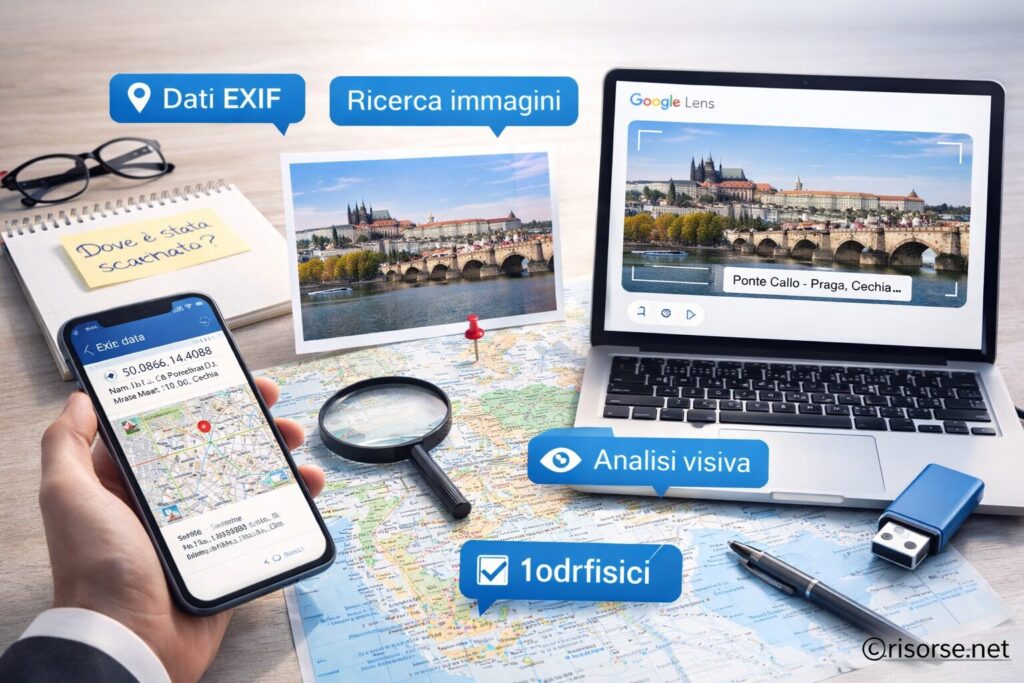
Understanding where a photo was taken is possible thanks to metadata, visual search tools, and analysis of details within the image. In this guide, we explain how to find the location of a photo using EXIF data, online services, and practical techniques, while also considering privacy and the limitations of these methods.
Understanding where a photo was taken is one of the most common curiosities in the digital age. You might come across a landscape on social media, an image shared on WhatsApp, or a photo found online and wonder: where is this place? Is it real? Is it near me? The good news is that there are several methods to try to trace the location of a shot. Some are technical, like analyzing EXIF data, others rely on online tools or observing visual details. In this guide, we examine all the available methods, when they really work, and their limitations.
The most accurate method by far is the one based on EXIF data (Exchangeable Image File Format). These are technical details automatically saved by cameras and smartphones at the moment of the shot. Among the EXIF data that may be present are:
GPS coordinates (latitude and longitude)
date and time of the shot
device model
camera settings
If geolocation was enabled at the time of the shot, it is possible to obtain the exact photo location, often with very high accuracy. To read this data, you can follow the complete guide: how to read a photo’s EXIF data. It’s important to know, however, that many platforms (such as social networks and messaging apps) automatically remove this data to protect users’ privacy. In these cases, the EXIF method will not be available.
2. Use reverse image search
When EXIF data is not available, the second most effective method is reverse image search. This system allows you to upload a photo and find similar images present on the web. Google Images and Google Lens are the most used tools for this type of search. They analyze the photo and look for visual matches, identifying:
places already photographed and published online
identical or similar images
contexts in which the photo has already been used
This method works particularly well with:
famous cities
monuments
tourist spots
recognizable landscapes
If you want to learn more, you can read: how to find a place from a photo. The main limitation is that it only works if the image (or a similar one) is already online.
3. Analyze the visual details of the photo
When there are no technical data nor online results, visual analysis comes into play. This method is more “manual,” but it can be very effective if you pay attention to details. Some useful elements to observe:
language of signs or billboards
architecture of buildings
vegetation and landscape
car license plates
symbols, flags, or cultural elements
For example, a specific type of building can suggest a precise geographic area, while the language of a sign can narrow the field to a specific country. This approach requires attention and some experience, but it is the same one used in many journalistic investigations and OSINT (Open Source Intelligence) analyses.
4. Use advanced tools and maps
Besides reverse search, there are advanced tools that help compare images with maps and geographic databases.
Google Lens to recognize visual elements
Google Maps and Street View to compare places
AI-based visual recognition tools
An effective approach is to combine these tools: first identify a possible location, then verify it through Street View. This method is particularly useful to confirm hypotheses and reduce the margin of error.
5. Attention to privacy and sensitive data
Photos can contain very sensitive information, especially if they include geolocation data. A simple image can reveal:
home location
places regularly frequented
movements and habits
For this reason, it is essential to know how to protect your data before sharing images online. You can learn more here: how to remove sensitive data from photos. Many platforms automatically remove metadata, but this is not always guaranteed.
The limits of available methods
It’s not always possible to trace the location of a photo. Several factors can prevent it:
absence of EXIF data
modified or cropped images
non-distinctive locations
photos never published online
low image quality
For this reason, it is often necessary to combine multiple techniques to obtain reliable results.
Conclusion
Understanding where a photo was taken is possible in many cases, but not always immediate. The main methods are three: EXIF data analysis, reverse image search, and visual observation. Added to these are advanced tools and maps to verify the information. The key is to combine multiple approaches and not rely on a single method. At the same time, it is important to be aware of the limitations and respect privacy, avoiding misuse of the information.
Frequently Asked Questions
Can the exact location of a photo be found?
Yes, but only if GPS data is present in the EXIF metadata or if the image is recognizable online.
Can Google find where a photo was taken?
Yes, through reverse image search or Google Lens, but not always with absolute precision.
Do social networks remove EXIF data?
Yes, most social networks remove metadata to protect user privacy.
Is it possible to remove geolocation from a photo?
Yes, it is possible to delete EXIF data before sharing an image.
Per fornire le migliori esperienze, utilizziamo tecnologie come i cookie per memorizzare e/o accedere alle informazioni del dispositivo. Il consenso a queste tecnologie ci permetterà di elaborare dati come il comportamento di navigazione o ID unici su questo sito. Non acconsentire o ritirare il consenso può influire negativamente su alcune caratteristiche e funzioni.
Funzionale
Always active
L'archiviazione tecnica o l'accesso sono strettamente necessari al fine legittimo di consentire l'uso di un servizio specifico esplicitamente richiesto dall'abbonato o dall'utente, o al solo scopo di effettuare la trasmissione di una comunicazione su una rete di comunicazione elettronica.
Preferenze
L'archiviazione tecnica o l'accesso sono necessari per lo scopo legittimo di memorizzare le preferenze che non sono richieste dall'abbonato o dall'utente.
Statistiche
L'archiviazione tecnica o l'accesso che viene utilizzato esclusivamente per scopi statistici.L'archiviazione tecnica o l'accesso che viene utilizzato esclusivamente per scopi statistici anonimi. Senza un mandato di comparizione, una conformità volontaria da parte del vostro Fornitore di Servizi Internet, o ulteriori registrazioni da parte di terzi, le informazioni memorizzate o recuperate per questo scopo da sole non possono di solito essere utilizzate per l'identificazione.
Marketing
L'archiviazione tecnica o l'accesso sono necessari per creare profili di utenti per inviare pubblicità, o per tracciare l'utente su un sito web o su diversi siti web per scopi di marketing simili.